Meta Quest model guide · Checked 2 October 2026
Quest 3 combines standalone gaming with colour mixed reality and pancake optics. The useful question is how those changes affect the things you actually do in VR.
This guide explains the hardware and its practical trade-offs using manufacturer documentation. It is not a claim that I have personally tested every headset. Meta Quest is the starting point for the apps and experiences on aHumaann.
Where Meta Quest 3 fits in the story
Quest 3 is the model to examine when the viewing experience matters alongside access to modern Meta Quest applications. It shares a newer computing platform with Quest 3S, but its lenses and display are key differences. That distinction is especially relevant to reading, creative tools and looking around a virtual screen.
Meta launched Quest 3 on 10 October 2023. The original prices were US$499.99 for 128GB and US$649.99 for 512GB. Those are launch figures. The present retail lineup and later price changes need to be considered separately.
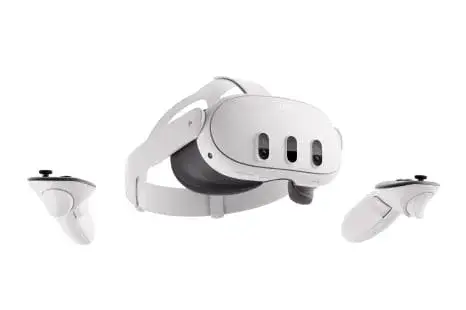
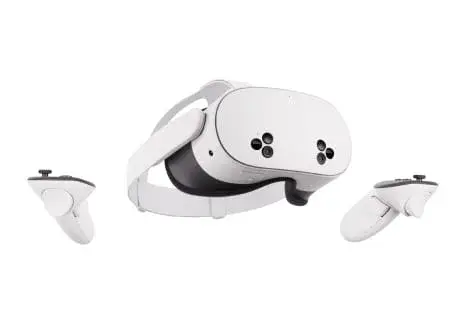
The main hardware includes Snapdragon XR2 Gen 2, 8GB RAM, pancake lenses, 2064 × 2208 pixels per eye and colour passthrough with a dedicated depth sensor. In everyday language, the headset can run compatible games on its own and place supported digital content into a camera view of your physical room.
Sources: Meta launch announcement, Manufacturer hardware details.
What it lets you do—and why that matters
The optical change is the part to try, rather than simply read about. Place a menu in front of you and move your eyes around it. Compare how often you need to turn your whole head to read the edge of a panel. Then try a game, because comfort and viewing preferences can differ between a stationary reading session and active movement.
Higher physical resolution can give the system more display detail to work with, but it does not guarantee that every application renders at that resolution. Developers choose render settings and performance trade-offs. Pixel count, lens clarity and the quality of the scene all contribute to what you see.
Mixed reality is another useful distinction. Colour passthrough gives compatible applications a way to place virtual things around a representation of your room. A creative workspace, a tabletop game and a full VR world use that capability differently. An app needs to implement the feature; owning a depth sensor does not turn every game into mixed reality.
You may need to describe your room to the system or follow an application’s setup flow. Clear the space first, then check the app’s instructions. A virtual object lined up with a real desk can be useful, but the camera view and room understanding are still a technology-mediated view. Keep physical obstacles and people in mind.
Touch Plus controllers remove the large tracking rings associated with earlier Touch designs. They still need correct batteries and a safe grip. Hand tracking is an alternative in supported interfaces and applications, not a promise that every controller-based game can be played without controllers.
For social and creative sessions, think about endurance as well as specifications. A comfortable fit, readable interface, charged headset and reliable connection can determine whether you stay engaged. A processor upgrade is only one part of that experience.
| Feature | What it means | What to check |
|---|---|---|
| Pancake optics | Different lens design and viewing characteristics from Quest 3S. | Try text, panel edges and fit before deciding. |
| Colour mixed reality | Camera-based room view with dedicated depth sensing. | Works where an app supports MR; clear physical hazards first. |
| Newer computing platform | XR2 Gen 2 and 8GB RAM. | Supports the current generation of compatible Quest apps. |
| Touch Plus | Tracked controllers with haptic feedback. | AA-powered controllers need their own battery routine. |
| Hand tracking | Controller-free interaction in supported software. | Keep controllers available for apps that require them. |
| PC VR option | Supported Link / Air Link setup. | Needs a suitable PC and connection; standalone purchases are a separate licence question. |
Specifications without the guesswork
| Specification | Details |
|---|---|
| Launch | 10 October 2023 |
| Processor / RAM | Snapdragon XR2 Gen 2 / 8GB |
| Display resolution | 2064 × 2208 pixels per eye |
| Optics | Pancake lenses; continuous lens-spacing adjustment |
| Refresh rate | Up to 120Hz, depending on application and mode |
| Mixed reality | Colour passthrough and dedicated depth sensor |
| Current standard capacity | 512GB; original 128GB version was also sold |
| Included controls | Touch Plus controllers; supported hand tracking |
| Typical battery estimate | About 2.2 hours; depends on activity |
| Headset charging | About 2.3 hours with the included 18W adapter, per Meta |
Historical specifications and launch prices describe the model when introduced. Software features, support, retail availability and bundles can change. Display resolution is not a measured game frame rate. Meta’s published Quest comparison.
Entry launch prices: a historical comparison
Display pixels per eye: calculated, not a performance test
| Configuration | US reference price |
|---|---|
| Quest 3S 128GB | US$349.99 |
| Quest 3S 256GB | US$449.99 |
| Quest 3 512GB | US$599.99 |
These are Meta’s published US price references, not a live checkout quote. Check local currency, tax, stock, warranty and included items before purchase. Games, subscriptions and optional accessories can add to the total. Meta’s April 2026 pricing update.
Limits, support and the ownership questions
Battery time is a planning limit. Meta gives a typical estimate of about 2.2 hours, with different estimates by activity. A three-hour watch party therefore needs a charging plan and breaks; it should not be advertised as guaranteed to fit inside one headset charge.
Comfort is personal. The included strap may be fine for a short session and less suitable for a longer one. Before buying accessories, adjust the fit and identify whether the problem is pressure, movement or balance. Check exact model compatibility for any strap or facial interface.
Colour passthrough is not identical to unassisted vision. Lighting, camera processing and the display affect the room view. Do not expect it to reproduce everything you see with the headset off. Similarly, a display refresh-rate option is not a guarantee that every game sustains that rate.
Storage is fixed when you choose the headset. Operating-system files and app data use part of the stated capacity, and game sizes differ substantially. Consider which large applications you want available together. More storage reduces the need to remove and reinstall content; it does not increase the processor’s speed.
The current purchase decision also includes price. Use published prices as a reference, then check your region’s actual retailer total, stock, warranty and included items. Old launch bundles and old discounted listings may no longer apply.
Reference: Manufacturer guidance and product context.
How it compares with other VR platforms
Compare a complete experience: headset, required computer or console, controllers, applications, accessories and the communities you want to join. A higher-resolution display can still be the wrong purchase if your essential app is missing.
| Alternative | Hardware / setup | Decision point |
|---|---|---|
| PICO 4 Ultra | Standalone; XR2 Gen 2, 12GB RAM, pancake optics. | Own software ecosystem; check your app and regional availability. |
| PlayStation VR2 | 2000 × 2040 per eye OLED; wired PS5 VR. | Needs PS5 for its console experience; PC use needs a separate supported setup. |
| Apple Vision Pro (M5) | Spatial computing; micro-OLED and eye/hand input. | Different apps and interaction model; not the native Quest game library. |
Specifications: PICO 4 Ultra, PlayStation VR2, PS VR2 PC adapter requirements, Apple Vision Pro M5.
PICO is the closer standalone comparison, but inspect its regional store and the exact application list. Do not assume that a Meta purchase transfers into another store. The question is whether the version and people you need are there.
PlayStation VR2 belongs in a console-based comparison. A PS5 is part of the standard experience, while PC use requires the supported adapter setup and a suitable computer. Platform-specific features and software can differ; do not assume a PC connection reproduces every PS5 feature.
Apple Vision Pro is relevant to spatial screens, media and computing, with a different app ecosystem and interaction model. It should not be treated as a drop-in replacement for standalone Quest gaming. Match the task first and compare the complete cost second.
A practical first-session plan
Start with the application you want to use. Read its supported headset list, age guidance, room-space requirement and internet requirements. If you are meeting other people, agree on the exact app and room before the session. “We are both using VR” does not establish that you can join the same place.
Set up in a clear area with room for your arms, controllers and movement. Remove trip hazards, keep pets and other people out of the play space, and consider a seated experience when the application supports it. The boundary is an aid; it does not physically stop you touching a wall or another person.
Find a comfortable image before tightening everything down. Start with short, low-motion sessions and take breaks if the experience becomes uncomfortable. Use the manufacturer’s safety information for the particular model, including any guidance relevant to your age or health. A more powerful processor does not eliminate motion discomfort.
Charge the headset and organise the correct batteries or charging method for its controllers. The two power systems are not necessarily the same. Use compatible equipment, keep charging ports clear and follow the product’s instructions. Do not assume all Quest controllers or accessories use interchangeable chargers.
For a creator, test recording and casting before a live session. What you can see in the headset may differ from what a stream audience receives. Check the app’s audio behaviour, the quality of the connection, and the other participants’ agreement to appear. Avoid discovering those limits during the event itself.
For troubleshooting, separate the headset, application, connection and account. If a single app fails while other apps work, begin with that app’s requirements and service status. If everything looks blurry, fit and lenses are a better starting point. If wireless PC VR stutters, inspect the PC and local network as well as the headset.
For model-specific care, safe use and charging instructions, consult Meta’s Quest safety centre. You can also read my first-days beginner’s guide for the basic controls and a session checklist.
The confirmed upcoming device: Meta VR Glasses
Meta has announced a separate device called Meta VR Glasses, planned for spring 2027 at US$1,299.99. It is the confirmed upcoming product discussed here, not a named “Quest 4”. Meta’s announcement.
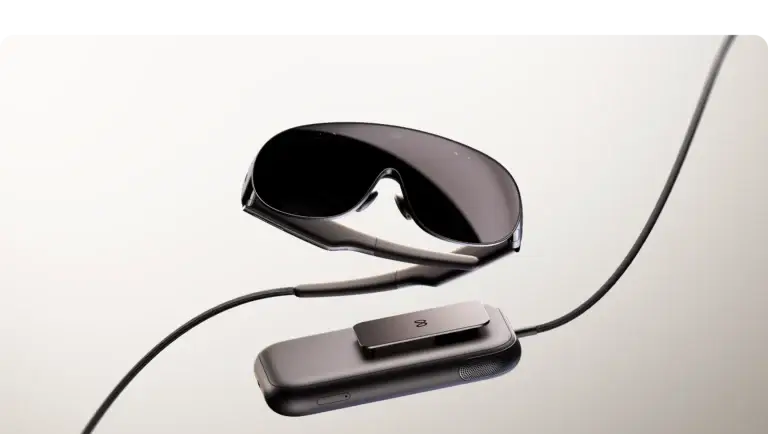
The glasses use a different physical arrangement, with computing and battery hardware in a separate puck. Meta’s developer material describes eye and hand input as central, with Touch Plus controllers available separately. That design changes the comparison: what sits on your face, what sits elsewhere, and how you interact all need to be considered together.
Do not compare a glasses-only weight with the full weight of an all-in-one headset and call that a complete system-weight comparison. Likewise, a high-resolution display does not prove every app will look or behave identically. Supported inputs, field of view, software implementation and the full setup matter.
If you are deciding whether to wait, identify what you need now. A future media or workspace-focused device may be attractive, but a planned release window is not a hands-on verdict or a guaranteed exact launch date. There is no reason to invent Quest 4 specifications, pricing or a release date to fill that gap.
For these guides, announced hardware is labelled as announced. Buying advice about an available device should be judged on the applications you can use, the total cost and the experience you can try today. Revisit the comparison when the new product ships and its real-world behaviour can be assessed.
For a Quest 3 owner, the announcement presents another form factor rather than an automatic reason to abandon a working headset. Compare the kinds of sessions you spend time in, and wait for practical evidence on comfort and software behaviour.
Input and platform details: Meta VR Glasses developer overview. Planned release information was checked on 2 October 2026.
How to make the choice for yourself
Quest 3 is worth comparing when the optical experience is a priority, especially if you regularly read menus, use creative tools or work with virtual screens. That is a more concrete reason to spend extra than expecting the name alone to transform every game.
Quest 3S is the direct budget comparison. Both use XR2 Gen 2 and 8GB RAM, but 3S uses Fresnel optics and a lower-resolution display. If the available 3S fits your budget and supports the games you want, the saving may be more useful than additional display detail.
Against competing platforms, start with the application list. PICO, PlayStation and Apple do not simply inherit your Meta purchases. A display advantage can be outweighed by losing access to an app or community you actually use. Multiplayer cross-play should be checked per game, not assumed from the fact that both products are VR headsets.
For an upgrade from Quest 2, try the optics and mixed reality first. Keep a list of the applications that require newer hardware. For an upgrade from Pro, consider whether you would lose an expression-tracking feature that is central to your workflow. Newer can improve one area while changing another.
| Question | Your next step |
|---|---|
| Which experiences matter? | List the exact games, creative tools and social apps you want. |
| Will they run on this model? | Check the supported devices, account requirements and online service. |
| Does the headset suit your eyes and fit? | Try reading, movement and your normal session length if possible. |
| What is the complete cost? | Add essential accessories, games and any PC or console requirement. |
| What will make you upgrade? | Identify the actual limitation: compatibility, optics, battery or workflow. |
Common questions
Is Quest 3 standalone?
Yes for compatible native Quest apps. PC VR is an optional separate setup that needs an appropriate computer and connection.
Is Quest 3 much clearer than 3S?
Their optics and resolution differ. Quest 3 uses pancake lenses and a higher-resolution display. Your fit, eyesight and the app’s rendering still affect the result; try the use case that matters to you.
Does every game use the depth sensor?
No. Applications decide which mixed-reality and room-understanding features to use. The hardware capability does not force every app to implement it.
Will 512GB make games faster?
Storage capacity determines how much content can be kept locally. It is not a processor or frame-rate upgrade.
Can it last for a three-hour event?
Do not assume that on one charge. Meta’s typical estimate is around 2.2 hours, with variation by activity. Plan charging, comfort breaks and the manufacturer’s recommended setup.
Choose your next guide
Read the Quest history and model overview, explore the VR app library, or compare another headset below.
Own this model? Share what works for you in the comments. For a longer story, app experience or collaboration, use Create with me.