Meta Quest model guide · Checked 2 October 2026
Quest Pro tried to bring expression, collaboration and work into standalone VR. Its specialist features deserve a closer look than a simple “better than Quest 2” label.
This guide explains the hardware and its practical trade-offs using manufacturer documentation. It is not a claim that I have personally tested every headset. Meta Quest is the starting point for the apps and experiences on aHumaann.
Where Meta Quest Pro fits in the story
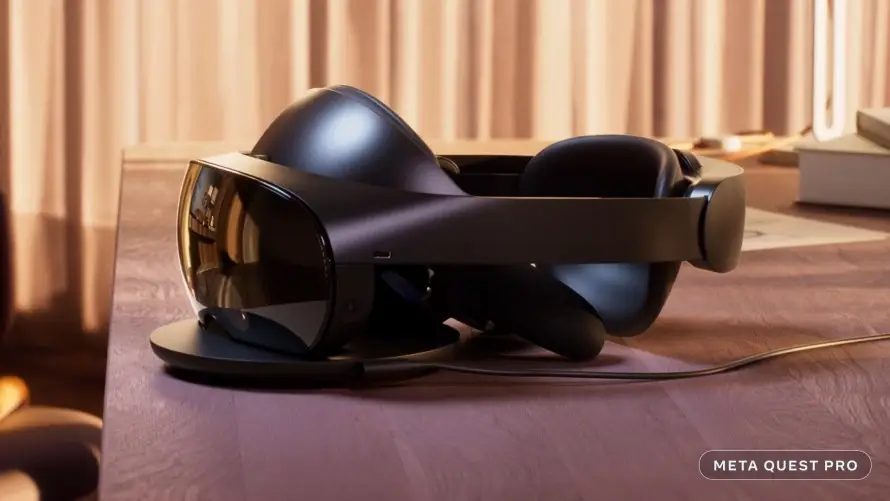
Quest Pro occupies a different place in the family from the numbered gaming headsets. It was introduced as a premium device for work, collaboration and more expressive virtual interaction. Its unusual shape, rear battery and specialist tracking features reflect those priorities.
It launched on 25 October 2022 at US$1,499.99. Meta describes pancake optics, colour passthrough, and eye and facial-expression tracking. Qualcomm identifies its platform as Snapdragon XR2+ Gen 1, with 12GB RAM and 256GB storage. A high launch price is a historical fact, not proof that it is the best purchase now.
For a creator or social VR user, the interesting question is not simply which headset has the highest number. It is whether a particular app can use the features that matter to you. Expression tracking has little value in an experience that does not support it, while display clarity matters every time you read a panel.
Sources: Meta launch announcement, Manufacturer hardware details.
What it lets you do—and why that matters
Pancake lenses allow a different optical layout from the Fresnel system in older Quest headsets. In practical terms, compare how easily you can look around a screen and read things away from the exact centre. A specification table cannot tell you whether the headset fits your head, glasses and preferred way of looking.
The rear battery changes how the weight is distributed. Balance can matter as much as total mass during a session. A device that spreads its weight differently can feel different without becoming light in the absolute sense. Avoid reducing comfort to a single number or treating one person’s fit as universal.
Eye tracking and facial-expression tracking are the features that make Pro particularly interesting for an avatar-focused site. Supported software can use them to represent aspects of where you look or how you express yourself. That does not mean every social world shows your face automatically. The application needs an implementation, your settings need to allow it, and the avatar needs suitable support.
Those features also deserve a deliberate privacy decision. Read the device and app settings before enabling tracking. Ask what is processed on the device, what the app can access, and what other people see. The visible expression of an avatar is not the same thing as understanding every use of its underlying tracking data.
Touch Pro controllers are a further distinction. Their self-tracking approach differs from relying only on the headset’s view of the controller. They are rechargeable accessories, so a routine that works for a disposable-AA controller does not transfer directly. Check their own charging and compatibility instructions.
For work, start with a task: reading documents, discussing a design, using virtual screens, or meeting people in a shared room. Then check the software. Buying hardware with a productivity label does not automatically supply your employer’s required applications, licences or security approvals.
| Feature | What it means | What to check |
|---|---|---|
| Eye tracking | Can support gaze-based behaviour in compatible software. | Check app implementation and privacy controls. |
| Facial-expression tracking | Can make supported avatars more expressive. | Requires a compatible app and avatar setup. |
| Pancake optics | A different lens design from Quest 2 / 3S. | Try reading and looking around the display, not only a central image. |
| Touch Pro controllers | Self-tracking, rechargeable controllers. | Include their charging routine and replacement cost in your plan. |
| Colour passthrough | Blends a camera view with compatible virtual content. | Quality and capabilities differ from newer MR devices. |
| Rear battery | Changes the balance of the headset. | Fit and pressure still need a personal trial. |
Specifications without the guesswork
| Specification | Details |
|---|---|
| Launch | 25 October 2022 |
| Launch price | US$1,499.99; historical |
| Processor | Snapdragon XR2+ Gen 1 |
| RAM / storage | 12GB / 256GB |
| Display resolution | 1800 × 1920 pixels per eye |
| Optics | Pancake lenses |
| Expression features | Eye and facial-expression tracking in supported applications |
| Design emphasis | Work, collaboration, expression and mixed reality |
Historical specifications and launch prices describe the model when introduced. Software features, support, retail availability and bundles can change. Display resolution is not a measured game frame rate. Meta’s published Quest comparison.
Entry launch prices: a historical comparison
Display pixels per eye: calculated, not a performance test
The launch price above is historical. For an older headset, compare the actual condition, included controllers, charging equipment, warranty and app support. A discounted used price should be assessed against a complete usable setup, not the original retail price alone.
Limits, support and the ownership questions
Pro’s specialist features need to be balanced against its age. It is not the same processor generation as Quest 3 or 3S. More RAM does not automatically make an older chip faster in every workload. Specifications describe different resources; they are not interchangeable scores.
Meta announced the winding down of Quest Pro retail sales alongside the arrival of Quest 3S. This makes condition, accessories and the exact app requirements particularly important when assessing a used unit. A sharply discounted premium headset can still be the wrong tool for a current game.
Inspect the lenses, display, charging contacts, controller tracking and included accessories. Ask to see the headset and both controllers charging. If a dock is missing, calculate the practical cost of a workable replacement setup. A listing with only a headset photograph leaves too much unanswered.
For an expression-focused purchase, verify your intended application first. Do not rely on a video showing someone else’s PC, custom avatar and additional software as proof that the same result will happen in your standalone setup. Identify each part of the demonstrated workflow.
For a work purchase, consider readable text, comfort, app availability and the connection to your actual computer. A headset can display virtual screens while still depending on another device for the applications running on them. It should improve the work you already do, rather than adding steps without a clear benefit.
Reference: Manufacturer guidance and product context.
How it compares with other VR platforms
Compare a complete experience: headset, required computer or console, controllers, applications, accessories and the communities you want to join. A higher-resolution display can still be the wrong purchase if your essential app is missing.
| Alternative | Hardware / setup | Decision point |
|---|---|---|
| PICO 4 Ultra | Standalone; XR2 Gen 2, 12GB RAM, pancake optics. | Own software ecosystem; check your app and regional availability. |
| PlayStation VR2 | 2000 × 2040 per eye OLED; wired PS5 VR. | Needs PS5 for its console experience; PC use needs a separate supported setup. |
| Apple Vision Pro (M5) | Spatial computing; micro-OLED and eye/hand input. | Different apps and interaction model; not the native Quest game library. |
Specifications: PICO 4 Ultra, PlayStation VR2, PS VR2 PC adapter requirements, Apple Vision Pro M5.
PICO is the closer standalone comparison, but inspect its regional store and the exact application list. Do not assume that a Meta purchase transfers into another store. The question is whether the version and people you need are there.
PlayStation VR2 belongs in a console-based comparison. A PS5 is part of the standard experience, while PC use requires the supported adapter setup and a suitable computer. Platform-specific features and software can differ; do not assume a PC connection reproduces every PS5 feature.
Apple Vision Pro is relevant to spatial screens, media and computing, with a different app ecosystem and interaction model. It should not be treated as a drop-in replacement for standalone Quest gaming. Match the task first and compare the complete cost second.
A practical first-session plan
Start with the application you want to use. Read its supported headset list, age guidance, room-space requirement and internet requirements. If you are meeting other people, agree on the exact app and room before the session. “We are both using VR” does not establish that you can join the same place.
Set up in a clear area with room for your arms, controllers and movement. Remove trip hazards, keep pets and other people out of the play space, and consider a seated experience when the application supports it. The boundary is an aid; it does not physically stop you touching a wall or another person.
Find a comfortable image before tightening everything down. Start with short, low-motion sessions and take breaks if the experience becomes uncomfortable. Use the manufacturer’s safety information for the particular model, including any guidance relevant to your age or health. A more powerful processor does not eliminate motion discomfort.
Charge the headset and organise the correct batteries or charging method for its controllers. The two power systems are not necessarily the same. Use compatible equipment, keep charging ports clear and follow the product’s instructions. Do not assume all Quest controllers or accessories use interchangeable chargers.
For a creator, test recording and casting before a live session. What you can see in the headset may differ from what a stream audience receives. Check the app’s audio behaviour, the quality of the connection, and the other participants’ agreement to appear. Avoid discovering those limits during the event itself.
For troubleshooting, separate the headset, application, connection and account. If a single app fails while other apps work, begin with that app’s requirements and service status. If everything looks blurry, fit and lenses are a better starting point. If wireless PC VR stutters, inspect the PC and local network as well as the headset.
For model-specific care, safe use and charging instructions, consult Meta’s Quest safety centre. You can also read my first-days beginner’s guide for the basic controls and a session checklist.
The confirmed upcoming device: Meta VR Glasses
Meta has announced a separate device called Meta VR Glasses, planned for spring 2027 at US$1,299.99. It is the confirmed upcoming product discussed here, not a named “Quest 4”. Meta’s announcement.
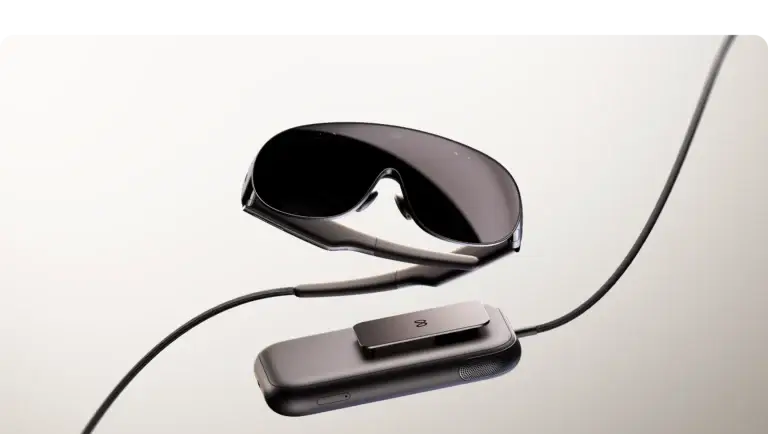
The glasses use a different physical arrangement, with computing and battery hardware in a separate puck. Meta’s developer material describes eye and hand input as central, with Touch Plus controllers available separately. That design changes the comparison: what sits on your face, what sits elsewhere, and how you interact all need to be considered together.
Do not compare a glasses-only weight with the full weight of an all-in-one headset and call that a complete system-weight comparison. Likewise, a high-resolution display does not prove every app will look or behave identically. Supported inputs, field of view, software implementation and the full setup matter.
If you are deciding whether to wait, identify what you need now. A future media or workspace-focused device may be attractive, but a planned release window is not a hands-on verdict or a guaranteed exact launch date. There is no reason to invent Quest 4 specifications, pricing or a release date to fill that gap.
For these guides, announced hardware is labelled as announced. Buying advice about an available device should be judged on the applications you can use, the total cost and the experience you can try today. Revisit the comparison when the new product ships and its real-world behaviour can be assessed.
For a Quest Pro owner, pay particular attention to expression tracking and inputs. Eye interaction in a new device is not proof that every Pro facial-expression workflow is reproduced. Check the actual app and avatar requirements before replacing a specialist setup.
Input and platform details: Meta VR Glasses developer overview. Planned release information was checked on 2 October 2026.
How to make the choice for yourself
Quest Pro can be a specialist option for someone with a verified need for its supported expressive tracking. I would require a concrete app and workflow before making that the deciding factor. A feature that sounds impressive but is unused in your favourite spaces does not earn its cost.
Quest 3 is the more relevant comparison for a broadly useful modern Quest setup: newer processing, pancake optics, colour mixed reality and access to applications built for the current generation. It does not inherit Pro’s eye and facial-expression tracking simply because it is newer.
For virtual work and media, compare Apple Vision Pro on the task rather than the brand. It is a different platform with its own software. For games, compare Quest’s standalone model with PlayStation VR2’s console setup. Your existing library, controllers and subscriptions affect the decision as much as the display.
If a used Pro is under consideration, set a maximum total cost before shopping. Include missing chargers, accessories, condition risk and whether the intended software remains supported. The original launch price should not be used to make an uncertain second-hand offer feel like a guaranteed bargain.
| Question | Your next step |
|---|---|
| Which experiences matter? | List the exact games, creative tools and social apps you want. |
| Will they run on this model? | Check the supported devices, account requirements and online service. |
| Does the headset suit your eyes and fit? | Try reading, movement and your normal session length if possible. |
| What is the complete cost? | Add essential accessories, games and any PC or console requirement. |
| What will make you upgrade? | Identify the actual limitation: compatibility, optics, battery or workflow. |
Common questions
Is Quest Pro a newer generation than Quest 3?
No. Pro launched in 2022; Quest 3 launched in 2023. Pro has specialist features that Quest 3 does not duplicate, but Quest 3 uses a newer processing platform.
Will every avatar show my facial expressions?
No. The app, avatar and tracking settings must support the feature. Verify your particular setup before buying for this purpose.
Does more RAM mean Pro is faster than Quest 3?
Not by itself. Processor architecture, graphics workload, software optimisation and memory all matter. A RAM number is not a benchmark.
Can Pro replace my work computer?
That depends on the workflow. Native apps and virtual-screen connections do different jobs. Check the applications you need and any computer they depend on.
Is a used Pro worth considering?
Potentially for a specific supported feature, after testing the hardware and complete charging setup. Compare the full cost and current app compatibility with newer alternatives.
Choose your next guide
Read the Quest history and model overview, explore the VR app library, or compare another headset below.
Own this model? Share what works for you in the comments. For a longer story, app experience or collaboration, use Create with me.